What is the best tool to measure pupillary distance online in 2026?
Desktop and mobile tests against an optician-measured pupillary distance. Only one tool scored 100%.
Executive summary
Why this article exists
If you're ordering glasses online (whether for distance vision, computer use, or progressive lenses) or setting up a VR headset, you'll often need your pupillary distance (PD), also called interpupillary distance (IPD). The problem? Many prescriptions don't include it, which is why online pupillary distance measurement tools have become so popular.
This article compares the most popular online PD measurement tools and reports what happened in a controlled, repeatable test.
What was tested
We tested the most popular online PD tools, representing the main approaches used today:
- Card-based methods (automatic or manual), where you hold a card as a scale reference
- Iris/face-based methods, where the tool estimates scale from facial features
Legal note: For legal reasons, competitor names are shown as Competitor A through E throughout this article. The measurement approach (card/iris, manual/automatic) is kept visible so the comparison remains meaningful.
Disclosure: This comparison was conducted and published by the PupiMetric team. We applied the same conditions, devices, and methodology to every tool tested, including our own. All raw measurements are provided in the data table below so you can verify the numbers independently. We encourage anyone to replicate this test and share their results.
🏆 High-level result
In this test (10 measurements per tool, compared against an optician-measured PD of 65 mm), PupiMetric's "precise pupillary distance" tool produced the closest and most consistent results overall. Other tested tools showed larger deviations and/or higher variability, especially between desktop and mobile.
Who is this for?
This article is for anyone who wants to:
- Measure pupillary distance online (PD/IPD)
- Order glasses online (including progressive lenses and computer glasses)
- Set up a VR headset IPD
- Understand why different tools give different PD values, and which approach is most reliable
Why pupillary distance accuracy matters
Pupillary distance (PD), also called interpupillary distance (IPD), is the distance between the centers of your pupils, measured in millimeters. It matters because lenses (and VR optics) work best when their optical centers line up with your pupils. Learn more in our frequently asked questions.
Far PD vs. near PD: not the same measurement
There isn't just one PD. In practice, there are two common values:
- Far PD (distance PD): used for distance vision glasses and often for VR headset IPD setup.
- Near PD: used for reading and computer glasses.
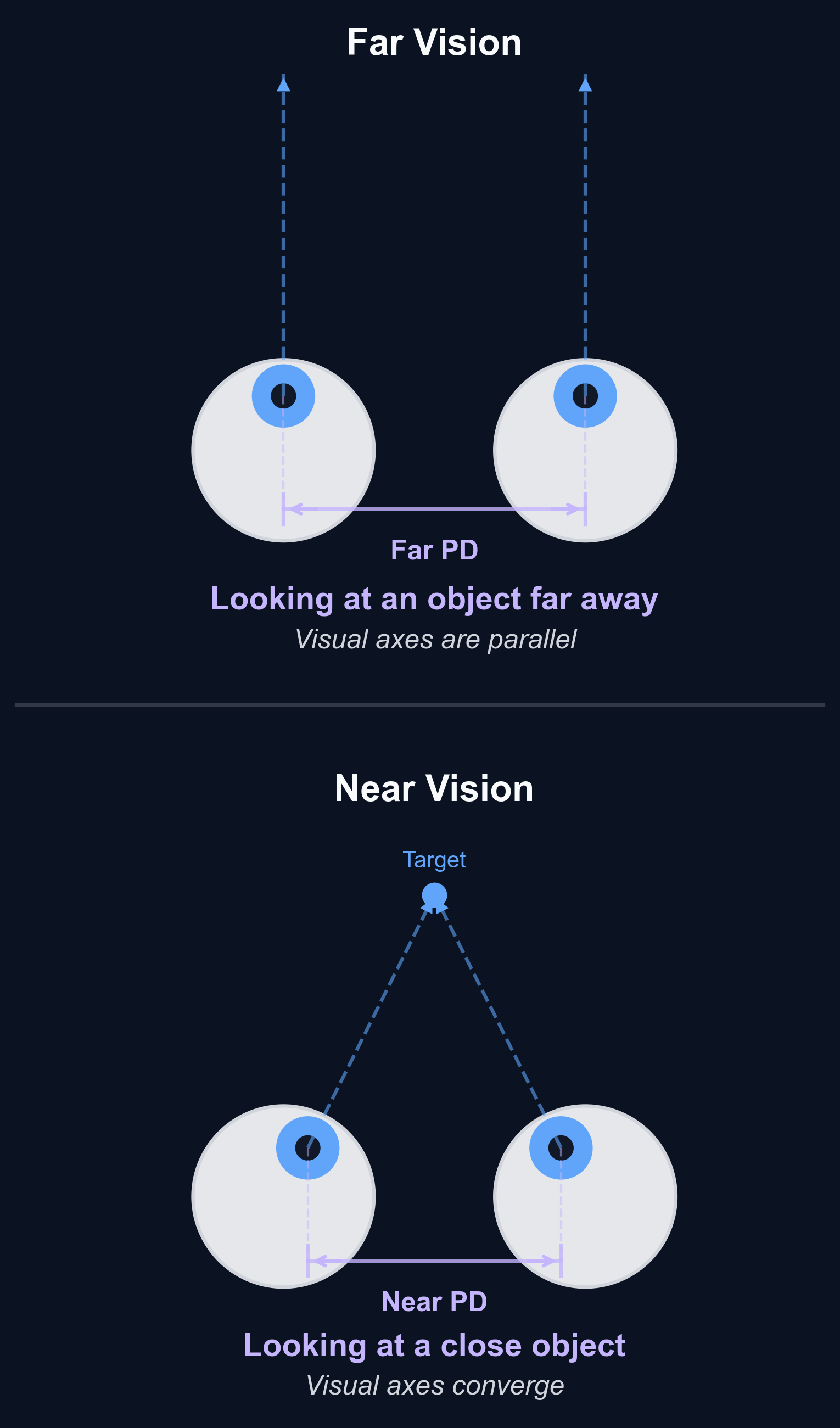
Near pupillary distance is usually smaller than far PD, by up to 3-4 mm, because your eyes naturally rotate inward when focusing on something close (this is called eye convergence). That's why a PD tool designed for distance vision can be misleading if you're ordering near-vision lenses.
Why this matters for your glasses
When you look at a screen or a book, your gaze isn't parallel: your eyes converge. If a tool assumes a fixed "far" gaze while you're actually focusing at a near distance, the reported PD can be off by a few millimeters. As soon as the error exceeds 1 mm, it can affect the quality of any type of glasses, from single-vision to progressive lenses. The effect is even more pronounced for complex lenses like progressives or computer glasses, where the optical zones are more sensitive to alignment.
What happens if your PD is wrong?
A small PD error (under 1 mm) usually does not cause obvious problems. But once the error exceeds 1 mm, the risk of discomfort increases significantly, especially for stronger prescriptions or complex lenses. Common issues reported with poorly centered lenses include:
- Eye strain (especially during screen use)
- Headaches
- Reduced clarity or a feeling that vision is "not quite right"
- Poor optical centering, where you end up looking through the wrong part of the lens
Bottom line: "Good enough" PD measurement depends on your use case, and that's why it's always best to compare online PD tools on both desktop and mobile against a known reference, if you have access to one.
Methodology
This comparison was designed to be simple, repeatable, and close to how people actually use online PD tools at home.
Tools included
We tested the most popular online pupillary distance measurement tools, found through common web searches for "measure pupillary distance online" and "online PD measurement", whether online tools or installable apps:
- Card-based tools (manual or automatic), which use a card as a size reference
- Iris/face-based tools, which estimate scale from facial features
What was measured
All measurements in this comparison target far pupillary distance (distance PD), the value typically used to order distance vision glasses and to set VR headset IPD.
Test procedure
For each tool:
- 5 measurements on a desktop/laptop (PC) using a webcam
- 5 measurements on a smartphone using the phone camera
- Same person, same face orientation, and similar posture across trials
- Similar indoor lighting conditions across trials
- Each tool was used exactly as instructed by the service
If a tool was not available on both platforms (for example, mobile-only applications), all 10 measurements were performed on the available platform instead.
For tools that require a card, the card was positioned according to the tool's instructions, and a new card was used for each measurement (5 cards in total).
Ground truth reference
To evaluate accuracy, results were compared against a manual PD measurement performed by an optician using a professional pupillometer, which gave a reference value of 65.0 mm (far PD).
The "comfort zone": what counts as an accurate result
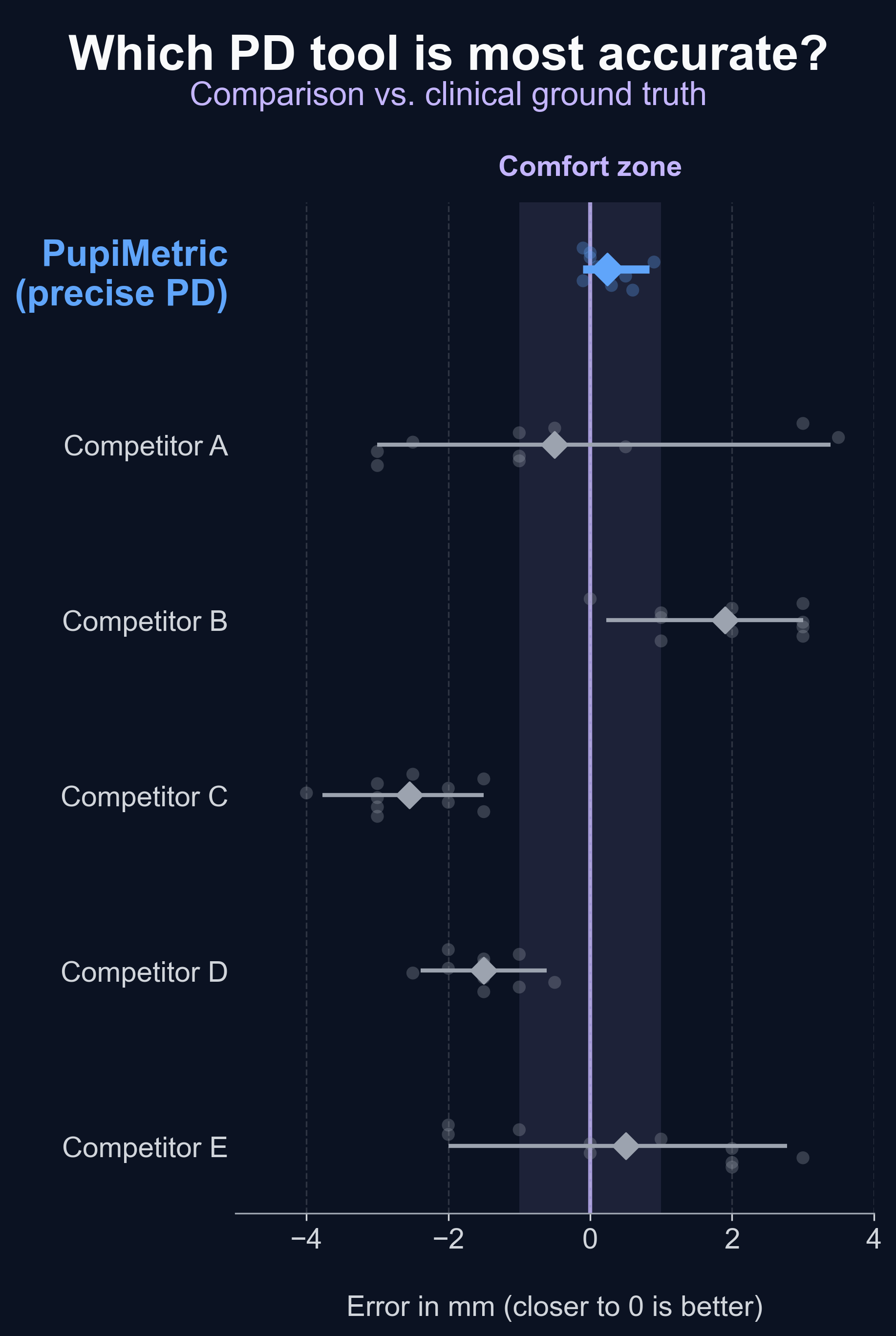
In this comparison, we define a result as accurate if it falls within ±1 mm of the optician-measured reference (i.e., between 64.0 and 66.0 mm). We call this range the "comfort zone".
An error of 1 mm or less is generally considered acceptable for ordering glasses: it is unlikely to cause noticeable discomfort. Beyond 1 mm, the risk of misaligned optical centers increases, which can lead to eye strain, headaches, or blurred vision.
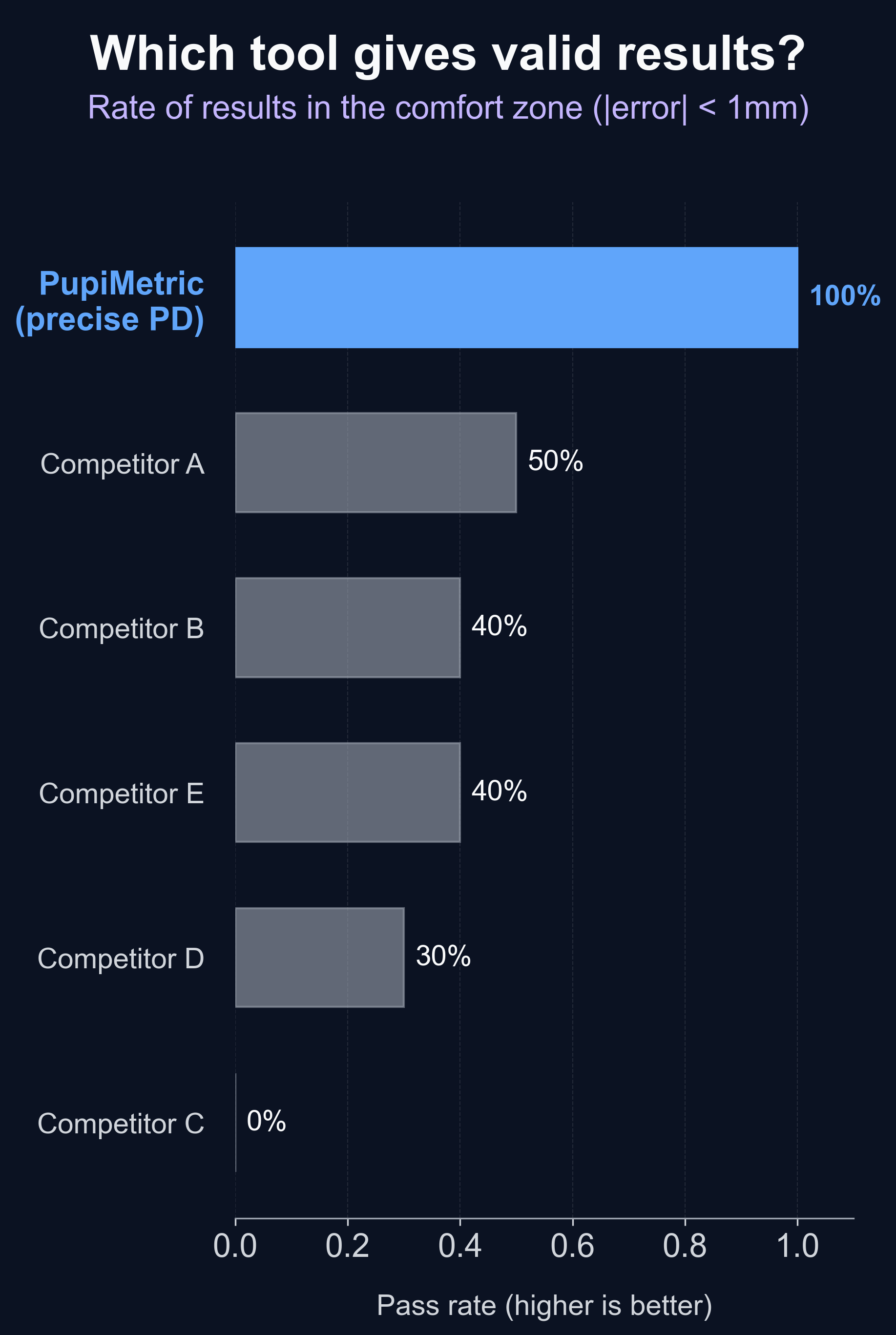
The pass rate reported for each tool is the percentage of measurements that fell within this ±1 mm comfort zone.
What this test can and cannot prove: This is a practical comparison, not a clinical study. It can show how consistent each tool is across repeated trials and devices, and whether it tends to overestimate or underestimate relative to a known reference. It does not prove performance for every face shape, camera, or lighting condition.
Accuracy results (far PD)
Reference ("ground truth"): 65 mm (far PD measured by an optician).
Each tool was tested 10 times. All values are in millimeters (mm).
Raw measurements
| Tool | Approach | Measurements (mm) |
|---|---|---|
| PupiMetric (Precise) | Card-based, automatic | 65.6, 65.3, 64.9, 65.5, 65.2, 65.1, 65.9, 65.0, 65.0, 64.9 |
| Competitor A | Card-based, automatic | 62.0, 64.0, 64.0, 62.0, 65.5, 62.5, 68.5, 64.0, 64.5, 68.0 |
| Competitor B | Iris/face-based | 66.0, 68.0, 67.0, 68.0, 68.0, 66.0, 66.0, 67.0, 68.0, 65.0 |
| Competitor C | Card-based, manual | 62.0, 63.5, 62.0, 63.0, 62.0, 61.0, 63.0, 62.0, 63.5, 62.5 |
| Competitor D | Card-based, automatic | 63.5, 64.0, 64.5, 63.5, 62.5, 63.0, 63.5, 63.5, 64.0, 63.0 |
| Competitor E | Iris/face-based | 67.0, 67.0, 68.0, 65.0, 67.0, 65.0, 66.0, 63.0, 64.0, 63.0 |
Summary
| Tool | Pass rate (within ±1 mm comfort zone) |
|---|---|
| PupiMetric (Precise) | 100% (10/10) |
| Competitor A | 50% (5/10) |
| Competitor B | 40% (4/10) |
| Competitor E | 40% (4/10) |
| Competitor D | 30% (3/10) |
| Competitor C | 0% (0/10) |
What these results mean
PupiMetric stayed tightly clustered around the optician value in both desktop and mobile trials, leading to the best overall accuracy and consistency in this dataset.
For the tested user, 100% of PupiMetric measurements fell within the comfort zone (within 1 mm of their actual pupillary distance), meaning every single result would have led to well-fitted glasses. The closest competitor achieved only 50%: a coin-flip chance of ordering glasses with a PD error large enough to cause discomfort, poor vision, or headaches.
Several tools showed larger variation between desktop and mobile, including occasional outliers on mobile (which can happen when camera alignment, distance, or scale estimation is unstable).
Important limitation: This is one person, one reference PD, one set of devices and lighting conditions. The purpose is to show how these tools behaved under the same setup, not to make a universal claim for all users.
💡 The bottom line
New glasses are an investment for the next few years. It's worth getting ones that are perfectly suited to your vision, including a correct pupillary distance, for your daily comfort.
PupiMetric achieved 100% accuracy within ±1 mm in this test. Try it yourself.
Measure your PD now →Why PupiMetric performs better
The differences between online PD tools usually come down to the same two problems: where you're looking (convergence) and where the reference object is in 3D space (parallax). If a tool doesn't model these effects well, it can produce a PD that is biased or inconsistent, especially between desktop and mobile.
Far PD vs. near viewing: convergence matters
When you measure far PD, the ideal situation is that your eyes are looking straight ahead, as if focusing on something far away. In real life, most online PD tools ask you to look at a screen that's 30 to 70 cm away.
At that distance, your eyes naturally rotate slightly inward to focus on the screen. This is called eye convergence, and it tends to make the apparent pupil positions look closer together than they would be when looking far away. If a tool doesn't compensate for convergence (or assumes the wrong viewing distance), the measured PD can drift by a few millimeters.
What PupiMetric does: It treats "far PD" as a geometry problem and explicitly accounts for the fact that the user is looking at a near screen. Users can even manually customize their distance from the camera to perfectly correct for eye convergence.
Parallax: the card and the eyes are not in the same plane
Many card-based tools use a card as a reference scale. The issue is that the card is held in front of the face, while the eyes are farther back. That creates a parallax effect: the apparent size and position of the card in the camera image changes with:
- How far the card is from the camera
- How far the card is from the eyes
- Small head tilts or card rotation
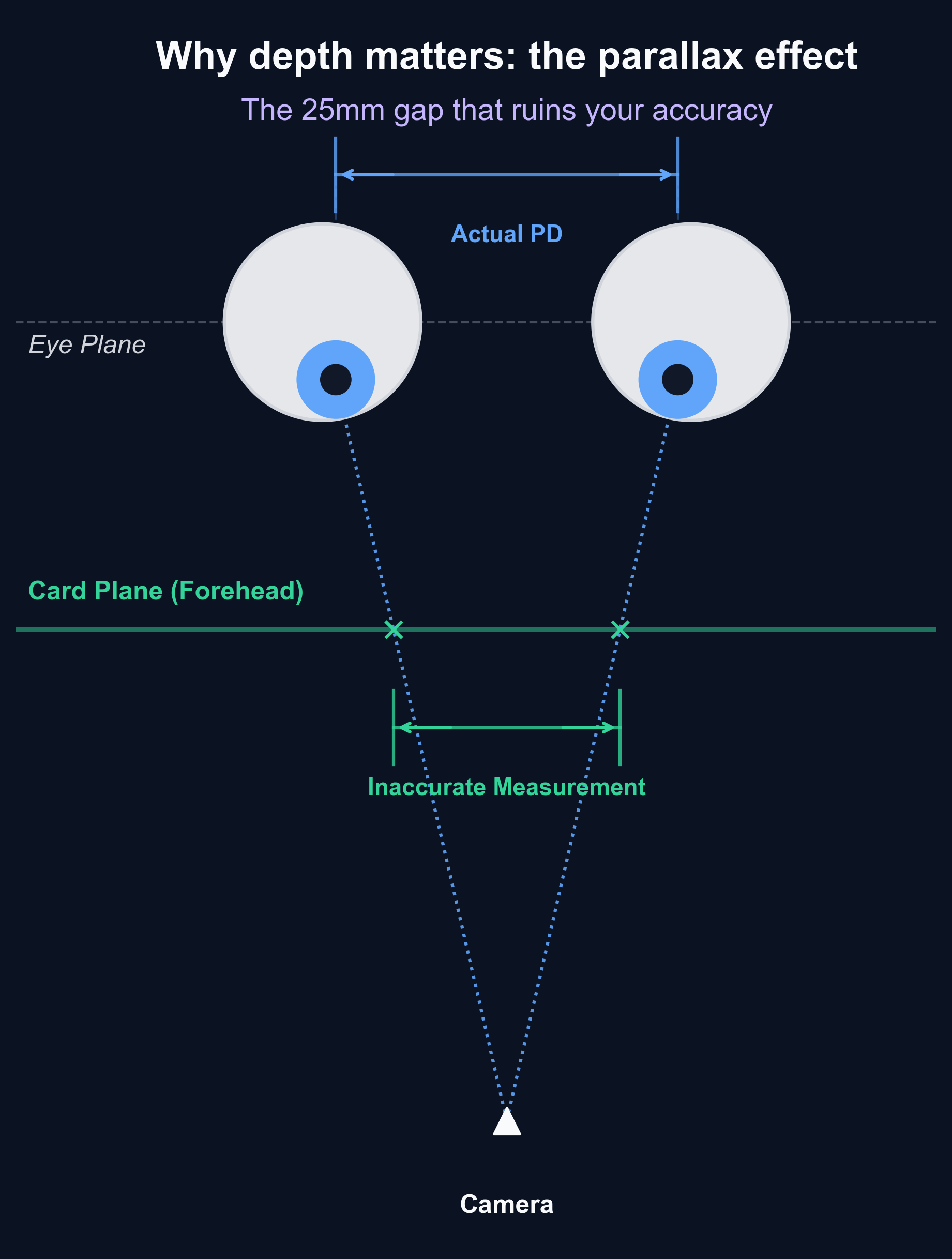
Two people can follow the instructions honestly and still get different results just from small differences in card placement.
What PupiMetric does: Instead of relying only on a card plane, it uses a model that is less sensitive to the "card in front of face" geometry. This helps keep results stable when the user slightly changes posture or camera distance, and it reduces the gap between desktop and mobile results.
Calibration strategy: using your actual setup
A common failure mode of online PD measurement is assuming a "typical" setup:
- Fixed camera field-of-view assumptions
- Fixed viewing distance assumptions
- Limited feedback to the user if the geometry is off
When those assumptions don't match your real situation (different phone camera, different laptop webcam, different distance), accuracy degrades.
What PupiMetric does: It's designed to adapt to the user's real setup and provide a more controlled measurement workflow. The goal isn't just a good average result, but also repeatability: getting the same PD when you repeat the measurement.
Key takeaway
As this comparison shows, most online PD tools do not provide measurements accurate enough to ensure comfortable glasses. The difference comes down to how well they handle the two main sources of error (convergence and parallax) across different devices. In this comparison, PupiMetric's approach produced results that were both closer to the optician value and more consistent between desktop and mobile.
Who should use PupiMetric?
If your goal is to measure pupillary distance online (PD/IPD) and get a result close to what an optician would measure, PupiMetric is best suited for:
Ordering glasses online
Use PupiMetric if you're buying glasses online and need a far PD value. In this comparison (desktop + mobile), it produced the closest and most repeatable measurements against a known optician PD. You can also use PupiMetric's quick PD tool for a fast free estimate.
Setting up a VR headset (IPD)
If you need an IPD value for VR, consistency matters: a stable measurement makes it easier to dial in headset settings without guessing.
Anyone who gets inconsistent results with other tools
If you've tried multiple online PD tools and received values that differ by several millimeters, that's a sign the measurement is sensitive to device setup (camera distance, viewing distance, alignment). PupiMetric is designed to reduce that sensitivity.
People who can't easily access an optician
If you don't have a recent PD measurement and want a practical option to measure PD at home, PupiMetric is a reliable starting point.
Not just far PD: This article focuses on far PD (distance PD), but PupiMetric doesn't stop there. Its tools also calculate your near pupillary distance, customized to the type of glasses you plan to order: progressive, computer, or reading glasses. You get the exact PD value your optician would use for your specific lenses, all from a single measurement session.
Ready to measure your PD?
100% accuracy within ±1 mm in our tests. Get your PD in 2 minutes.
Measure your PD now →